
In Episode 1, I wrote about TOO_MANY_PARTS, the error that gave me the most nightmares. This one is about TTL, the feature I trusted the most. We put a TTL on every logs table from day one, and for almost two years we never thought about it. Then, in our final months on ClickHouse, it caused two incidents.
Defining and changing a TTL
In ClickHouse, retention is a TTL clause on the table. Here is a trimmed version of our logs table:
CREATE TABLE logs
(
    `timestamp`      DateTime64(6),
    `namespace`      LowCardinality(String),
    `container_name` LowCardinality(String),
    `pod_name`       String,
    `message`        String,
    -- ...
)
ENGINE = MergeTree
PARTITION BY toDate(timestamp)
ORDER BY (toStartOfHour(timestamp), namespace, container_name, pod_name, timestamp)
TTL toDateTime(timestamp) + INTERVAL 30 DAY;
Rows expire 30 days after their timestamp. It just works. Changing retention is a single statement:
ALTER TABLE logs MODIFY TTL toDateTime(timestamp) + INTERVAL 365 DAY;
This statement looks very safe, right?
The incidents we hit
Incident 1: raising retention rewrote the whole table
A customer asked us to keep their logs for 365 days instead of 30. We ran MODIFY TTL, as we had done for other customers before. Within a minute, CPU on that ClickHouse service jumped from under 10% to over 90%, and our on-call was paged.
By default, MODIFY TTL also starts a mutation (MATERIALIZE TTL) that applies the new TTL to every existing part. system.merges showed it rewriting every part of the table, even though nothing needed to be deleted, because retention was getting longer. Some of the rewrites failed on memory limits and started over. We scaled up temporarily and waited about 12 hours. Customers didn't notice.
Now, when we change a TTL, we run these two statements instead:
ALTER TABLE logs
MODIFY SETTING materialize_ttl_recalculate_only = 1;
ALTER TABLE logs
MODIFY TTL toDateTime(timestamp) + INTERVAL 365 DAY
SETTINGS materialize_ttl_after_modify = 1;
Why this works:
materialize_ttl_recalculate_only= 1 changes whatMATERIALIZE TTLdoes. It only recalculates when each part's rows expire and stores that in the part's metadata. It does not apply the TTL, so it doesn't rewrite the data. Rows that have already expired are removed later by the regular TTL merges.materialize_ttl_after_modify= 1 (the default) keeps that cheap step inMODIFY TTL. You could turn it off to make theALTERinstant, but then existing parts would not pick up the new TTL.
Incident 2: TTL merges kept using CPU after we stopped writing
In one deployment, we stopped writing logs to ClickHouse and shrank the services to the minimum, 2 vCPU per replica. I expected them to sit idle. Instead, the CPU alert fired every four hours, at up to 100%.
There were no writes and almost no queries, only background merges. system.part_log showed what kind: the same table was going through TTL merges again and again within 24 hours, with fewer rows each time.
Our tables were partitioned by day with a 30-day TTL, and a day of logs expires gradually over 24 hours. By default, ClickHouse deletes expired rows by rewriting the part without them, and it repeats that every 4 hours. So each day of logs got rewritten about six times on its way out.
This had been happening all along. Our only remaining ClickHouse cluster showed the same pattern. Every four hours, CPU jumped from about 28% to 100% for a moment, then stayed around 40% for a long while. The 100% spike was so brief that it never triggered an alert, so we never noticed.
In hindsight, we had been paying for that CPU the whole time, because we sized our clusters for these spikes.
The fix was one setting. It tells ClickHouse to drop whole parts once all their rows have expired, instead of rewriting them. Here is what we applied to all the day-partitioned tables in our remaining ClickHouse cluster:
ALTER TABLE logs MODIFY SETTING ttl_only_drop_parts = 1;
At the next 4-hour mark, CPU peaked at about 20% instead of 100%. We then downsized that cluster and saved 6 vCPU per replica. The trade-off is that expired rows can stay up to one extra day. Our tables are partitioned by day, so a part is dropped only after its whole day has expired.
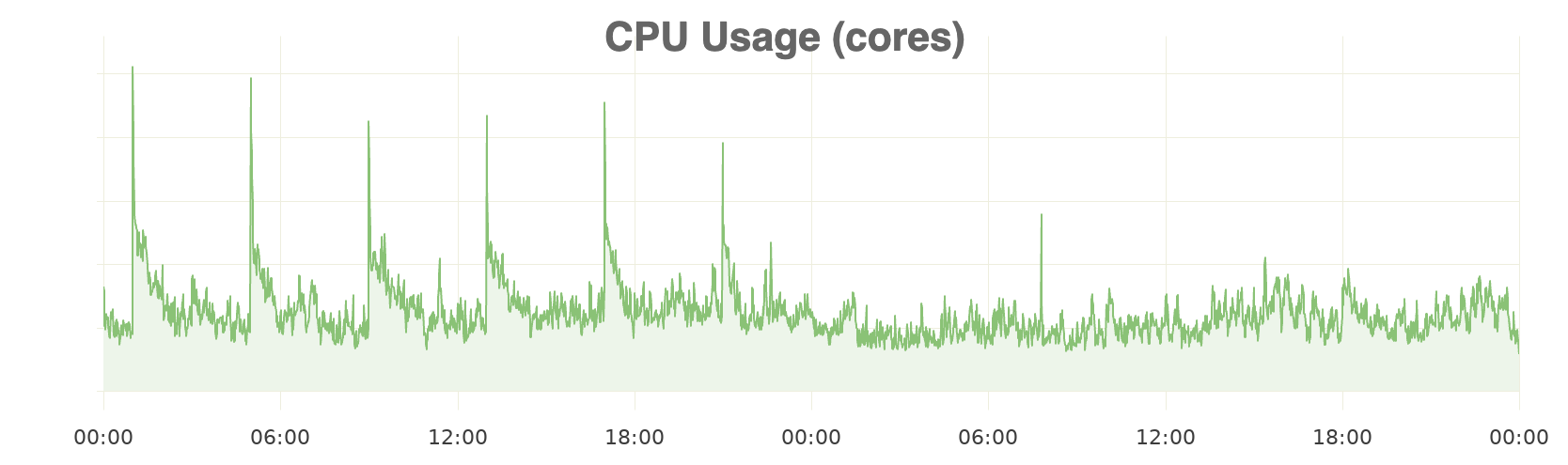
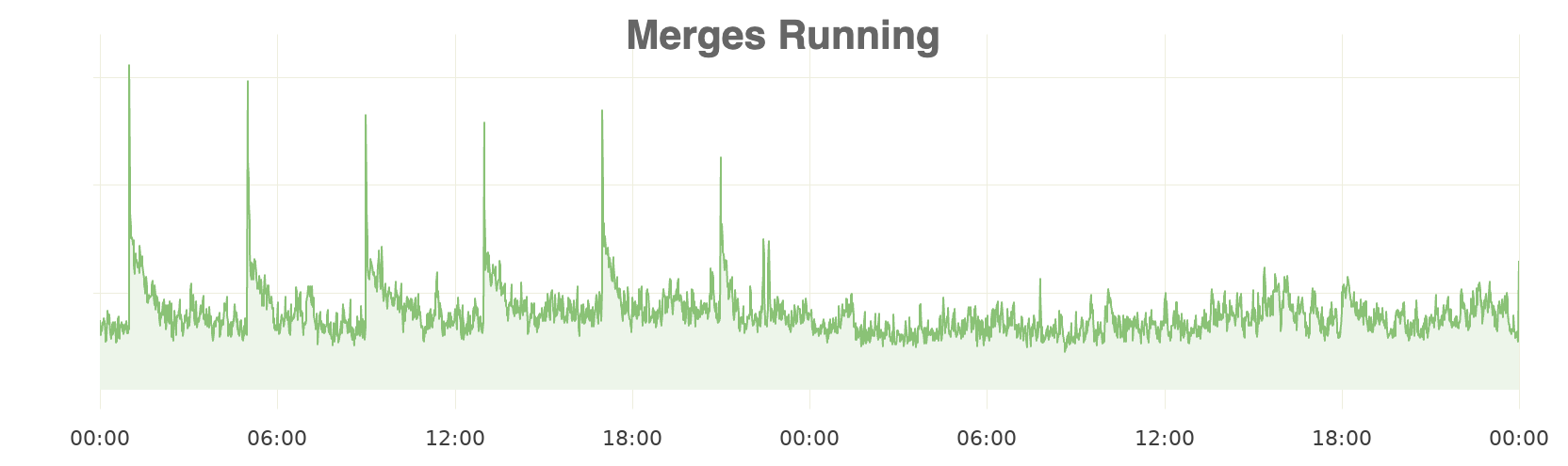
CPU usage and running merges on that cluster. The spikes every 4 hours stop after ttl_only_drop_parts is turned on.
How TTL actually deletes data
Looking back, both incidents come from the same fact. A TTL only says when rows expire. ClickHouse removes them later, during merges, in one of two ways:
- Rewrite (the default). ClickHouse writes the remaining rows into a new part, and repeats that every 4 hours (
merge_with_ttl_timeout) while rows keep expiring. - Drop (
ttl_only_drop_parts= 1). ClickHouse waits until every row in a part has expired, then drops the whole part. This costs almost nothing, and works best when the partition matches the retention unit, such as daily partitions for day-level retention.
On top of that, MODIFY TTL applies the new rule to every existing part, unless you ask it to only recalculate. So with the defaults, you pay for TTL either every few hours, or all at once when you change it. We paid both without knowing it.
What's next?
Dropping whole parts instead of rewriting them fixed the spikes, but it wasn't the end of the story. A few days later, one table's daily partitions had grown past 200 GiB, and two merges kept failing on the memory limit for 19 hours. That's the next topic: merges failing on memory limits.