Why a wrong tool call comes back as success
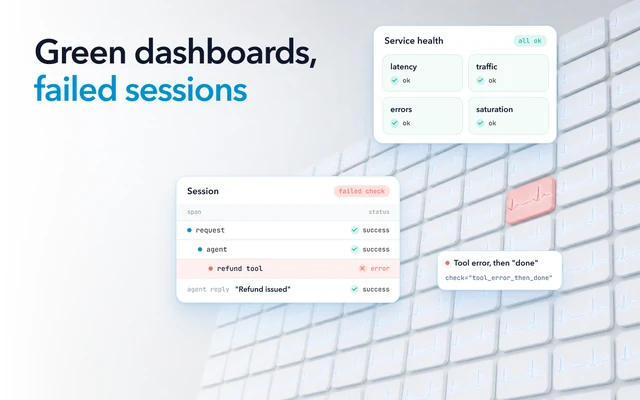
The default tool-calling loop has no check on whether a call was the right one. By default the model decides when and how many tools to use, and it chooses by reading the names and descriptions you gave each tool. The tool then runs whatever it was asked to run. If the call was well formed, the tool returns a result, its span ends OK, and the model moves on to its answer.
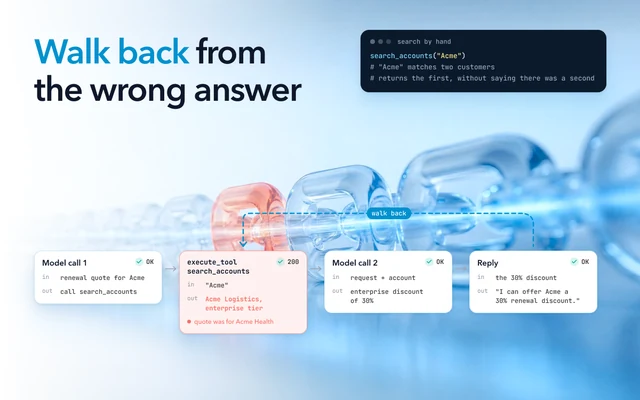
An issue on LangGraph's GitHub shows this with two flight search tools.
The model chose flight_search_pro over search_flights because its description promised more. The call was
valid, and the model then, in the reporter's words,
"reports that result to the user without any indication it noticed anything wrong."
A model can also skip the tool and write the result itself. In a bug report on another framework, a custom model generated a fake tool output and went on to its final answer, and the reporter found no sign of the tool in their logs or traces.
Agents fail differently from ordinary services: a wrong or skipped tool call comes back with no error. Catching it means reading the tool calls themselves.
Record both halves of every tool call
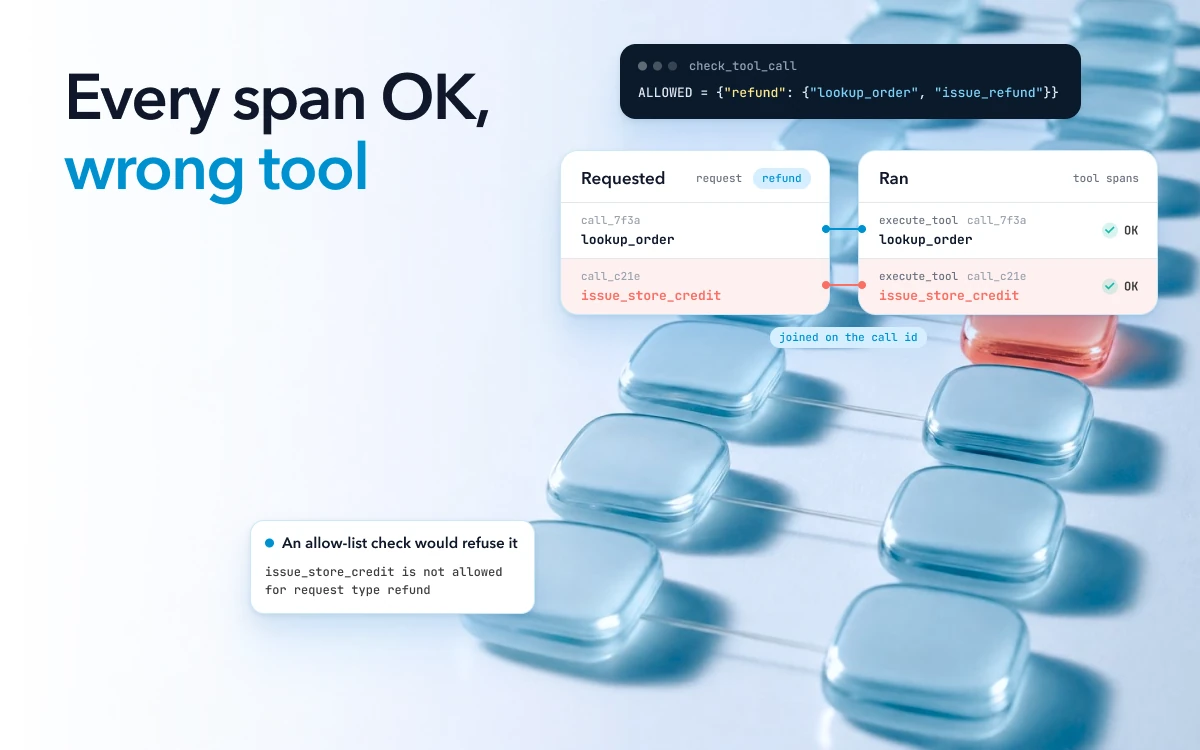
One tool call shows up in two places in the trace, and a check can only read what you captured. The first is the requested call. The model's response lists each tool it wants called, with a name, the arguments and a call id. OpenTelemetry's GenAI conventions define each requested call on the model call's span as a tool call requested by the model.
The second is the call that ran. It is a span named
execute_tool plus the tool's name,
with the arguments, the result and the same id, which the conventions describe as
"The tool call identifier supplied by the model or provider."
That id joins the two. A requested call with no matching tool span, or a tool span with no requested call behind it, is
the first thing to look for.
Most of those fields are off by default. OpenTelemetry's conventions tell instrumentations not to capture prompts and model outputs by default, and a tool call's arguments and result are both opt-in attributes. Turn that capture on, or your checks have nothing to read. Some agent SDKs record a tool call's inputs and outputs by default, so check one trace from yours before you rely on it.
Record two more things while you are there. Tools your own code runs are often missed by automatic instrumentation, and the conventions encourage you to instrument those calls by hand. The list of tools the model was offered can also go on the model call's span, as another opt-in attribute. A wrong choice often comes down to how two descriptions read side by side, so you want to see what the model saw.
Tool arguments hold customer ids, addresses and amounts, and the conventions mark them as an attribute that "may contain sensitive information." Redact what your checks do not need. For production, the conventions also describe keeping model inputs and outputs in separate storage with its own access controls, and a reference to it on the span.
What each kind of agent tool calling error looks like in the trace
A wrong tool or wrong arguments show as an OK span, a skipped tool as no span at all, and a requested call that never ran as a call id with no tool span. The examples are made up, for a support agent that handles refunds.
| What went wrong | What the trace shows | What catches it |
|---|---|---|
| The wrong tool | A requested call and a tool span for a tool this kind of request should not use, such as issue_store_credit when the customer asked for a refund. Both are OK |
An allow list for each kind of request, checked before the tool runs |
| A skipped tool | No requested call and no tool span for a step the request needed, such as the order lookup. The answer holds facts, such as an order date, that no tool returned | A check for required steps before the answer goes out |
| A call requested but never run | A tool call in the model's output, with no execute_tool span carrying its id |
The join on the call id. A call your code refused has a tool span with ERROR status, so no span at all means the tool has no instrumentation |
| A result with no call behind it | The conversation shows a tool result, but no execute_tool span exists for it |
The same join, the other way round. Then check whether the tool is instrumented |
| The right tool with the wrong arguments | issue_refund ran and returned OK, with another customer's order id, or an amount larger than the order total |
An argument check against data from the session |
| A tool error the agent talked over | The tool span is OK, its result holds an error, and the next model reply tells the user it worked | A check of tool results for error payloads, which then marks the span as an error |
Record the calls your code refuses on the tool span too. Otherwise a call your code refused looks the same as a tool you forgot to instrument.
Refuse a bad call before the tool runs
The lowest-cost place to catch a bad call is your own code, between the model's request and the tool. Start with the schema. Turn on strict mode where your API offers it, or validate the arguments against a typed model. Strict mode makes calls "reliably adhere to the function schema", which catches a missing field or a string where a number belongs. It says nothing about the values. An order id in the right format that belongs to another customer passes.
Next, refuse tools the request may not use. Keep a list of the tools each kind of request may call, with the kind of request set by your own routing, not chosen by the model, and check every requested call against it before your code runs the tool. Some APIs can also restrict the tools a model may call for a request. The framework will not make this choice for you. When the flight search issue was closed, a contributor wrote "the model picks the tool, not langgraph" and pointed to a check in your own code.
Then check the arguments against what the session already knows. An order id should be the order this session looked up for this customer, and a refund should not be larger than that order's total. This is the check that catches the right tool called for the wrong customer.
The function below runs before each tool call in a refund agent. session["results"] holds what your code received
from each tool earlier in the session, so the check reads what the tools returned, not what the model says they
returned.
class ToolCallRefused(Exception):
    pass

# Tools each kind of request may call, and the steps a tool needs first.
ALLOWED = {"refund": {"lookup_order", "issue_refund"}}
REQUIRED_FIRST = {"issue_refund": ["lookup_order"]}

def check_tool_call(session, name, args):
    """Run before the tool does. Raise to refuse the call."""
    if name not in ALLOWED.get(session["task"], set()):
        raise ToolCallRefused(f"{name} is not allowed for request type {session['task']}")
    for step in REQUIRED_FIRST.get(name, []):
        if step not in session["results"]:
            raise ToolCallRefused(f"{name} called before {step}")
    if name == "issue_refund":
        order = session["results"]["lookup_order"]
        if order["customer_id"] != session["customer_id"]:
            raise ToolCallRefused("the order belongs to another customer")
        if args["order_id"] != order["order_id"]:
            raise ToolCallRefused("order_id is not the order looked up in this session")
        if args["amount"] > order["total"]:
            raise ToolCallRefused("refund is larger than the order total")
When the check refuses a call, send the model a short reason as the tool's result, so it can correct the call or tell the user it cannot help. Set the tool span's status to ERROR and add the full reason as an attribute. The refusal then shows in the trace, and you can count it.
Stop the answer when a required step is missing
A skipped tool leaves no call to refuse, so this check runs when the model returns its final answer. For each kind of request, list the steps that must have run before the agent may reply. A refund reply needs the order lookup, and an order status reply needs it too. Compare that list with the tool results in the session. If a step is missing, send the model back to run it, or hand the conversation to a person, instead of sending the answer.
Where every request of one kind needs a tool, you can also force the call. Some APIs let you require that the model call at least one function, or one specific function, instead of leaving the choice to the model.
A rougher check catches skips the list does not cover. Look for facts in the answer, such as an order number, a date or an amount, that appear in no tool result from the session. An answer about an order that no lookup returned did not come from a tool.
Evaluate agent tool selection with trajectory tests before release
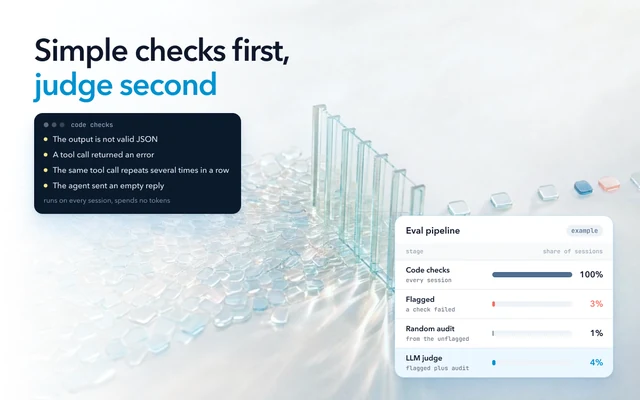
Code checks catch only what you wrote rules for, so also check sessions after they finish, starting in your tests. The list of tool calls an agent made, in order, is its trajectory. In tests, compare it with a reference trajectory for that task. One open-source evaluator offers strict, unordered, subset and superset matching: in order, in any order, nothing beyond the expected tools, or the key tools somewhere among others.
Check whether your evaluator compares arguments. The open-source one, by default, treats two calls as equal only with the same arguments. Another common tool correctness metric compares tool names by default and checks arguments only if you turn that on. A match on names alone passes the refund to the wrong customer.
Check finished sessions in production
In production there is rarely a reference trajectory, and an open-ended agent may not have one at all. Instead, check what must hold in every session: the required steps ran, every id in a call that changes data came from an earlier tool result or your own session data, and no tool outside the allow list ran.
Then count, per tool and per week, the calls your code refused, the sessions missing a required step, the argument checks that failed, and the tool errors followed by a reply that said the task was done. A rise in any of them after a prompt or model change is the regression to look into.
Leave an LLM judge for what rules cannot decide, such as whether an open question needed a tool at all. A judge-based trajectory check needs no reference trajectory.
How to tell the fix worked
Run the reported session's recorded tool calls through your new checks. The check should refuse or flag the call that went wrong, and since this needs no model, you can repeat it. Then add the user's input to your tests with its expected tool list. Run it several times, because the same input does not always produce the same calls.
In production, the count for the failure you fixed should fall in the weeks after the change, and no other count should rise.
Seeing every tool call next to the rest of the session in Oodle
In Oodle, agent traces sit on the same platform as your logs, metrics and application traces. When your services pass trace context and send their spans, one trace runs from the API request through the agent and its tools to the database. You can read each tool call and what it returned alongside the model calls around it. Oodle shows each tool call's arguments and result wherever your instrumentation captures them, and OpenTelemetry's conventions leave them off by default.
Every session is analyzed at scale using statistics, ML classifiers and a small model for sentiment. Oodle's agent then checks each issue it finds against the evidence and removes the noise. As each session
arrives, Oodle flags tool failures, including errors your agent talked over. An example on Oodle's
insights page shows one. A cancel_subscription call
returned {"error": "unknown tool: cancel_subscription"} with its span OK, the agent told the customer the
subscription was canceled, and the session is flagged as a tool failure, tool not found.
You can also write a failure rule in plain English. Oodle's own example fits this case: a refund over $500 must never be issued without a lookup first. The daily pass looks for it and lists what it finds with the traces attached, so it is a check after the fact, not a block before the call.
The tool failures Oodle labels Bad arguments or Not allowed come from the tool's own error, not from Oodle checking the arguments. A refund against another customer's order still needs the argument check in your own code, before the tool runs. Start by turning on argument capture for your tool spans, because without it no backend has the arguments to show.