Tracing shows what your agent did, and agent evaluation tells you whether it worked
Tracing alone is not enough to check your agent's answers, because a trace shows what the agent did and not whether the task got done. In Anthropic's guide to agent evals, a trace is the transcript, "the complete record of a trial, including outputs, tool calls, reasoning, intermediate results, and any other interactions". Whether the task got done is the outcome, and it is checked separately. In the guide's example, a flight-booking agent says the flight is booked, and the outcome is whether a reservation exists in the database.
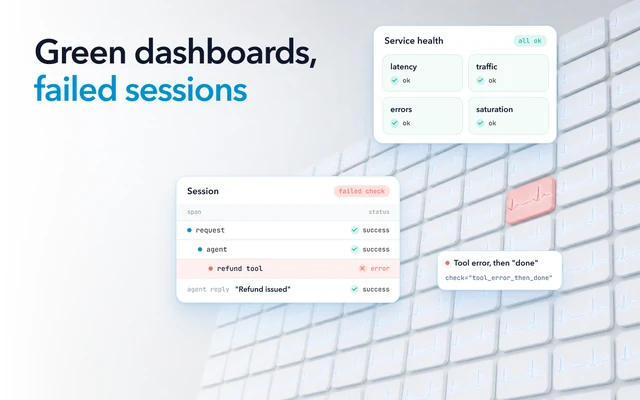
So every call in a trace can look fine while the outcome is wrong. Reading traces one at a time can catch that for one session. It cannot tell you whether the agent is right across hundreds of sessions, or whether last week's prompt change made answers worse.
An eval does that job. It runs the agent on a fixed set of cases, scores each result against what should have happened, and gives you a score to compare from one version to the next. You need both. Most of the eval cases come from the traces.
What one golden dataset case holds
A case holds the input, the context the agent needs to handle it, and a definition of a correct result that a person has reviewed. The input is what the user sent. The context is what the agent worked with, such as retrieved documents, the results its tools returned and the conversation so far.
For an agent, a case without the tool results cannot test the steps that depend on them. To test the whole session, either save what each tool returned and replay it, or run the agent end to end against test versions of its tools.
The definition of a correct result is an exact expected output where one answer is right, or a pass criterion where many answers are acceptable. Each is checked by one of three kinds of grader: a person, a model acting as a judge, or code, such as a check that the reservation exists. Label each case with where it came from and which kind of failure it covers, so you can report scores by category later.
A case taken from production is only a candidate until someone has reviewed its expected output. The expected output usually starts as the answer the model gave in production, corrected by someone who knows the domain. That review is what makes a case golden rather than merely logged.
Where golden dataset cases come from in production
Start from the sessions where your agent failed. If you are already in production, Anthropic's guide points to your bug tracker and support queue, and says that "20-50 simple tasks drawn from real failures is a great start." In practice, the candidates are:
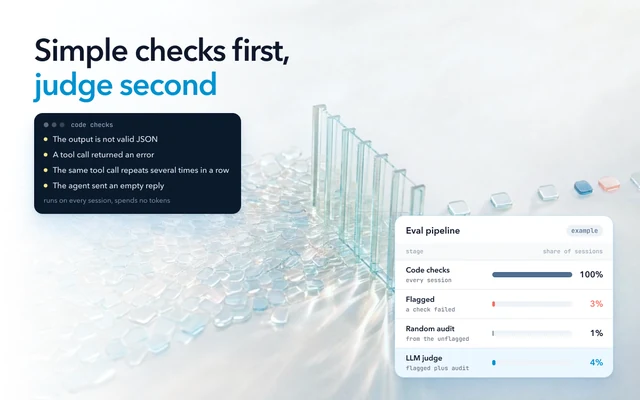
- Sessions your automated checks flagged, such as a failed tool call, a loop or a conversation that ended with no answer.
- Sessions with low user feedback, a retry or a hand-off to a person.
- Sessions linked to a support ticket or a bug report.
- New kinds of request the set does not cover yet.
- A slice of sessions that went well.
The last group keeps the set matched to your real traffic. OpenAI's guide lists, as a design mistake, eval sets that do not "faithfully reproduce production traffic patterns". The opposite mistake is a set your agent already passes. "An eval at 100% tracks regressions but provides no signal for improvement."
Generated cases can fill a gap that production has not shown you yet, such as a rare language or an edge case in your policy. They go through the same review as any other case, and they do not replace failures your users have hit, because real traffic beats invented examples.
Before review, drop near-duplicates. Twenty phrasings of the same question count that case twenty times in every average score and slow every run.
What to automate, and the step a person keeps
Automate everything up to the expected output, and leave the expected output to a person.
Many tracing and eval tools already move traces into datasets. You can add traces from a filtered table, in bulk, or with an automation rule on conditions such as a low feedback score. The dataset is versioned on every change, so an experiment can pin the version it ran against.
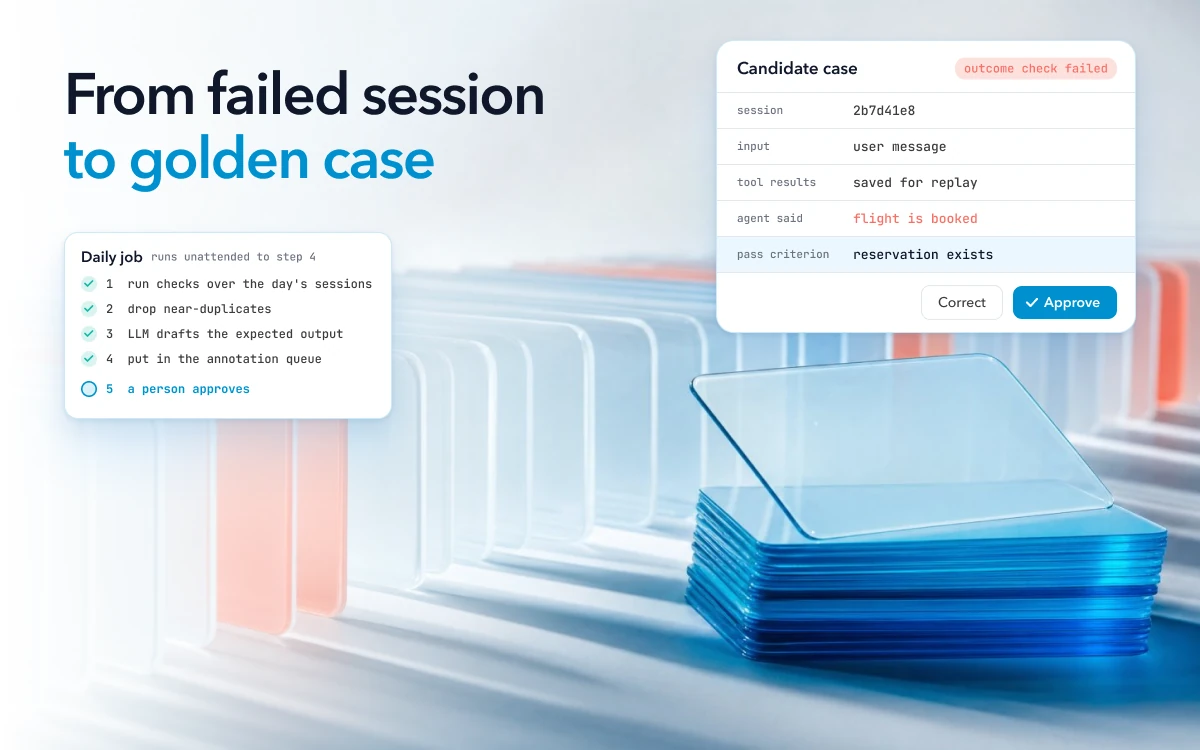
A script still does the work between finding a candidate and adding it. A pipeline that runs every day looks like this:
- Run your checks and filters over the day's sessions, and collect the ones that match.
- Drop near-duplicates, and candidates that match a case already in the set.
- Have an LLM draft the expected output from the production answer and its context.
- Put each candidate in an annotation queue, with its trace attached.
- Add it to the dataset only after a person approves or corrects the expected output.
Steps 1 to 4 can run unattended, and step 5 cannot. The expected output or pass criterion is what every score is measured against. If a model writes it and nobody checks it, a wrong expected output stays in the set, and an agent that gives the same wrong answer passes on every run. An LLM judge that grades the agent needs the same care, and OpenAI's eval guide says to "Use human feedback to calibrate automated scoring."
So whether a candidate arrives through an "Add to dataset" button or through your script matters less than where it goes next. Either works if it goes through review before it counts in a score. LangSmith lets a reviewer edit the expected output from a trace before it is added.
Keeping the dataset current while scores stay comparable
A golden dataset goes stale as your traffic changes, so it needs new cases on a schedule. It also needs versions, so this month's score on the core can still be compared with last month's. A set built in January describes January's traffic, and by July users ask different questions and the product has new features.
- Keep a stable core. Score every version of the agent on the same core cases, so a drop means the agent changed and not the dataset.
- Add cases in a new version. Each add, update or delete creates a new dataset version, so compare a release against the core and against the latest version.
- Retire a case with a reason. When the product stops behaving a certain way on purpose, the old expected output is wrong. A note on why the case was retired keeps the history readable.
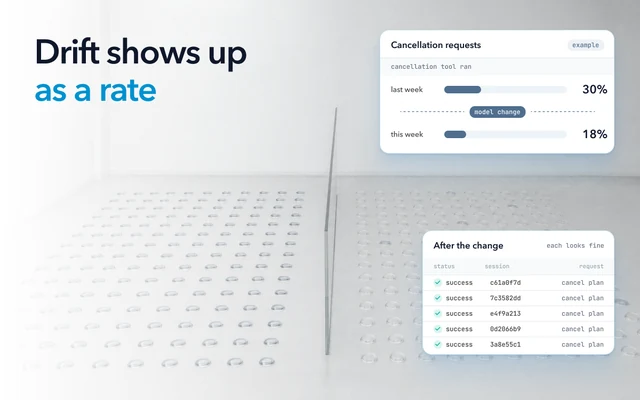
- Re-run on every change and on a schedule. Run evals on every change to the model, prompt or tools, and grow the eval set over time. A scheduled run also catches a model update you did not make.
- Report by category. One average can hold steady while refunds get worse and greetings get better.
The dataset can only hold the sessions your tracing kept
A failure becomes a case only if its session still exists, in full, when someone decides it belongs in the set. Your tracing settings decide that, usually long before anyone reviews a candidate.
Head sampling drops sessions before anyone knows how they ended, because a head sampler decides as early as possible, without inspecting the trace as a whole. Teams sample to control cost, and a trace the sampler drops is gone. Langfuse's SDK drops a trace it did not sample on the client, with all of its observations and scores. In LangSmith, sampling is a rate you set. With random sampling, your chance of still having a failed session is your sample rate, so at 10% it is gone nine times in ten.
Retention decides how long you have to notice. As of October 2026, LangSmith keeps base traces for 14 days, after which they are no longer accessible in the UI or through the API. Its datasets are kept indefinitely. Extended traces are kept 180 days for an added fee, and an automation rule can upgrade the traces it matches to extended. Langfuse Cloud's free plan shows 30 days of data, and its paid plans longer. A session your team reviews after that window can no longer become a case, unless it was added to a dataset first.
The same limit applies to a rule you write for a new kind of failure. It can collect matching sessions only from what is still kept. A LangSmith rule can be applied to past runs only when you create it, and only runs still inside their retention window are there to match.
In full also means with the prompts and responses. OpenTelemetry's generative AI conventions say instrumentations should not capture model instructions, user messages or model outputs by default. A case needs the exact input and context, so decide what to capture and what to redact before the failure happens.
Before you automate anything, compare your sample rate and how long a trace stays readable with how often your team reviews failures. Then open one failed session and confirm that its prompts, responses and tool results are all there.
A first dataset from the sessions you have now
Pull 20 to 50 failed sessions plus a slice of good ones, have a person approve each expected output, and save the set as version one. You can build it from the sessions your tracing still holds.
- Pull the sessions that failed a check, got low feedback or match a support ticket.
- Drop near-duplicates, and pick 20 to 50 that cover different kinds of failure.
- Add a slice of sessions that went well, so the set looks like your traffic.
- Have an LLM draft each expected output, then have a person who knows the domain correct and approve each one.
- Save the set as version one, run your current agent against it, and note the score for each category.
- Turn steps 1 and 2 into a daily job that fills an annotation queue, and add approved cases in new versions.
The cost that stays is the reviewer's time. Tune the filters so the queue holds no more cases than your reviewers can approve each week, failed sessions first.
Why Oodle can keep every session for review
Oodle writes traces straight to object storage, in a columnar format of its own, and runs each query on serverless compute. So Oodle keeps every agent session in full for your retention period (30 days on Pro, longer for an added fee), and a failure is not lost to sampling before anyone reviews it. Everything above depends on the failed session still being there when someone decides it belongs in the dataset.
Oodle identifies issues in your agents out of the box: tool failures, loops, outages, stalled conversations. Any trace can be added to a dataset. Whichever tool scores your evals, check how long your failed sessions stay readable before you decide how often to review them.