Why the evals still pass after the agent got worse
Evals pass after a bad change because they test a fixed set of cases written before the change, and the change broke something outside that set. Say a support agent has 50 eval cases. After a model upgrade, it stops calling its cancellation tool when users word the request a way no case covers, and tells them their plan is cancelled anyway. Every eval case still passes.
OpenAI's evaluation guide names this as a design mistake, an eval set that does not faithfully reproduce production traffic patterns.
An average score also hides new failures. If three cases flip from pass to fail and three others flip the other way, the pass rate does not move, and the three new failures go out with the release.
An LLM judge adds its own error. Researchers have measured a dozen kinds of bias in LLM judges and found that significant biases persist in strong models on some tasks. A judge that calls its model through an alias can also change under you, and then its scores move for reasons that have nothing to do with your agent.
Evals still do their job for the cases they cover. A set your agent passes in full still tracks regressions on those cases. It cannot see the cases nobody wrote down, and after a change those are the ones in your production traffic.
Record which model, prompt and context served every session
Record the model you requested and the model that answered on every call, plus the prompt and context settings, so you know which sessions ran before the change. The model is the hard part, because the name you call is not always the model that answers.
A dated model snapshot is meant to stay fixed. Snapshots exist so that performance and behavior remain consistent, and a pinned model ID's underlying model remains constant for the life of that ID (both as of October 2026).
Aliases move. An alias such as OpenAI's chat-latest points to a
snapshot that "will be regularly updated", and some
Claude aliases point to the most recent dated snapshot
for their version. An agent that calls an alias can change model with no change in your code. So can an agent behind a
gateway that falls back to another model or provider when the first one fails.
Even a pinned model runs on serving infrastructure that changes. One provider returns a system_fingerprint with
each response
so you can monitor changes in the backend.
A name that hides a change of model is an old problem. In 2023, researchers found that the March and June versions of GPT-4 behind the same service scored 84% and 51% on the same prime-number questions. That study is now three years old and says nothing about today's models. It shows only that one name can cover a large change in behavior.
So record two model names on every model call, the one you requested and the one that answered. OpenTelemetry's GenAI
conventions have an attribute for each, gen_ai.request.model and gen_ai.response.model, and define the second as
the model name returned in the response.
The conventions are still
in Development status
as of October 2026, so check what your instrumentation emits. Then record the rest of what can change, so every
session carries it:
- the model requested and the model that answered, on each model call
- the backend fingerprint, where the provider returns one
- the prompt version, as a version number or a hash of the prompt text
- the context settings, such as the window size and how older turns are trimmed or summarized
- the version of each tool and its schema
Pin dated snapshots wherever the provider offers them. Alert when the model that answers a given requested name changes from one day to the next. Every change then has a time on your session data, and you know which sessions came before it and which came after.
Find LLM drift by comparing groups of sessions from before and after the change
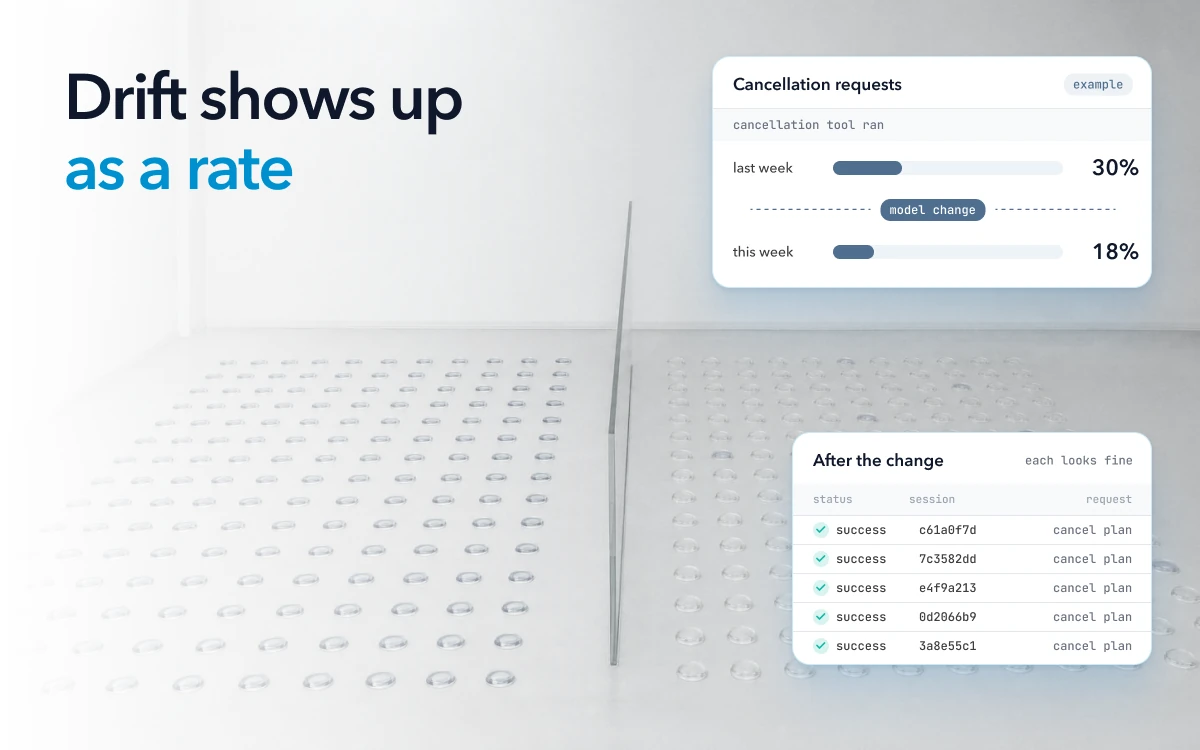
With the change marked, compare the sessions on each side of it as two groups, because drift is a change in rates that no single trace shows. Read one at a time, each session after the change can look fine. Read as a group, the same sessions might show, for example, that the cancellation tool ran in 30% of cancellation requests last week and in 18% this week.
Compare like with like. Take the same kind of task, over windows of the same length and the same days of the week, just before and just after the change. Then compare these rates for each kind of task:
| What to compare, per session | What a shift can mean |
|---|---|
| Which tools were called, and how often each one | The agent stopped using a tool, or calls one where it should not |
| Steps and turns | The agent loops, retries or gives up sooner |
| Share of sessions failing each check (outcome checks, tool errors, loops, stalled conversations) | A failure that was rare is now common |
| Share of sessions where the user repeats the request or gives up | Users are not getting what they asked for |
| Refusals and hand-offs to a person | The new version is more cautious, or less able |
| Tokens | Longer reasoning, a longer context or a loop |
Look at each kind of task on its own. An average across all of them can stay flat while one kind collapses.
Rule out a change in traffic before you blame the agent. A new customer, a holiday or a launch changes what users ask, and the rates move with it. Start by comparing the mix of task types on both sides. If the mix moved, compare within each type, or wait for a window where it held.
Sometimes you see drift with no change marked, such as this week's sessions doing worse than last week's. Then the first job is to find the change. Check whether the model that answered changed, whether a fallback started serving traffic, and whether the mix of tasks shifted. Then compare the sessions on each side of what you found, or, for a fallback, the sessions each model answered.
Once a rate has moved, open sessions of that kind from both sides and read them next to each other. The rate tells you where to look, and the sessions show you what the agent now does differently.
The replay before release, described below, tests the inputs you chose, and live traffic tests the rest. Where you can, send a small share of traffic to the new version and compare it against the rest at the same time, so both groups see the same traffic. Many changes ship with no canary, prompt edits most of all. For those, the before-and-after comparison on production sessions is the test, so mark the change and run the comparison on the first full window after release.
Is the agent worse, or just different?
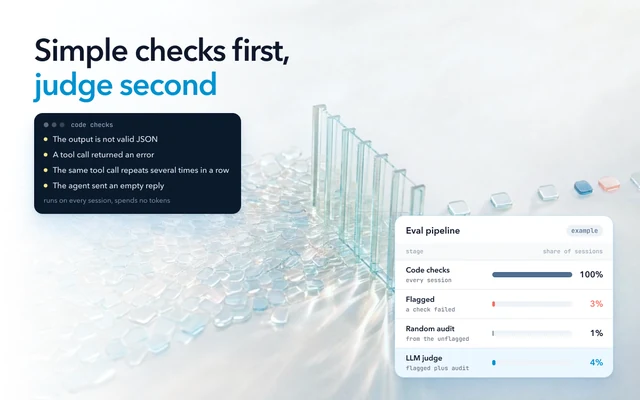
An agent is worse when an outcome you care about got worse, and only different when it took another path to the same outcomes. Decide what "worse" means before you look at the comparison, using checks that do not need a judge's opinion:
- an outcome check against your own data, such as whether the subscription the user asked to cancel is cancelled
- a policy check, such as whether a refund stayed within its limit
- a user signal, such as the user repeating the request or giving up
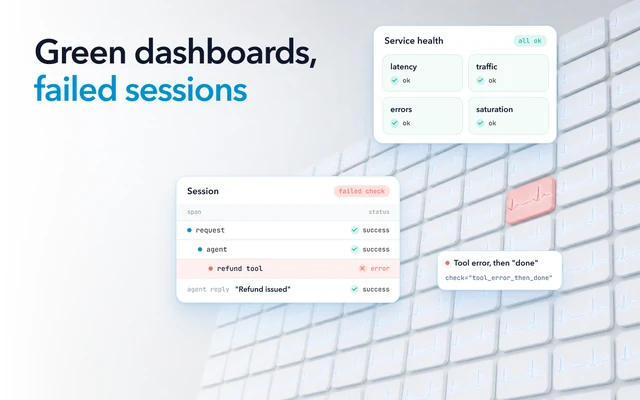
The agent's own message that the task is done is not the outcome. The outcome is the final state when the session ends, in your database or the system the agent acted on.
Some qualities, such as the tone or helpfulness of an answer, only a judge or a person can score. For those, use the judge on pairs. Show it the old and new answers to the same input, ask which is better, then ask again with the order swapped, because LLM judges carry measurable biases. Check its verdicts against a few dozen answers people have labeled before you rely on it. A judge's average score moving by a point is not evidence on its own.
Then read the comparison. If the path changed, with different tools or fewer steps, and every outcome rate held, with enough sessions to have seen a drop, the agent is different. If an outcome rate moved the wrong way by more than noise, it is worse.
How many sessions it takes to see a drop
Seeing a failure rate rise from 4% to 6% takes about 1,860 sessions on each side, more than an eval set of a few dozen cases holds. That assumes 4% of sessions of one kind failed an outcome check before the change, and the usual standard: a two-sided test at 95% confidence with 80% power. The number grows quickly as the change you want to see shrinks:
| Failure rate before | Failure rate after | Sessions needed on each side |
|---|---|---|
| 4% | 5% | about 6,750 |
| 4% | 6% | about 1,860 |
| 10% | 12% | about 3,840 |
These come from a standard test for two proportions, and your own rates give your own numbers. With 50 sessions on each side, the failure rate would have to jump from 4% to about 23% before the test could reliably see it.
That jump is the comparison's minimum detectable effect, the smallest change a comparison of a given size can reliably see. Before you trust a comparison, calculate the minimum detectable effect and decide whether the comparison is worth running.
If your agent handles a few hundred sessions of one kind a day, production supplies a few thousand within days, as long as you kept them. Sampling, which teams set to control cost, cuts the count. At a 1% sample, keeping 1,860 sessions per side means sending 186,000 sessions of traffic through each side.
Run an LLM regression test before you ship: replay real sessions on the old and new version
Before you ship a change, run the old and new version on the same real inputs and compare them case by case, because paired results need fewer cases than two separate groups. Take recent sessions from production: the ones that failed, plus a slice of the ones that went well, across your kinds of task. Replay each input on both versions, with the tools' recorded results or test versions of the tools, so the replay does not act on real accounts.
Run each input several times on each version, because outputs vary between runs with the same settings. Even with a fixed seed, one provider says determinism is not guaranteed.
Then look at which cases flipped. A case that passes on the old version and fails on the new one across its runs is a regression, whatever the average says. Comparing each case with itself takes the differences between cases out of the noise. That is why Evan Miller (2024) calls the variance reduction from paired differences "free" when you compare two models, and why he recommends the paired standard error wherever practicable, along with resampling each question several times.
The paired standard error is worked out from the paired differences, each case's score on the new version minus its score on the old one, rather than from each version's scores on their own.
How to tell the drift is fixed
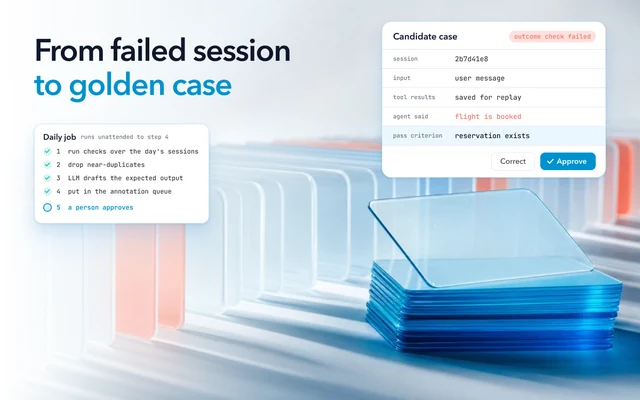
The drift is fixed when the rate that moved moves back on the next comparable window after the fix, for the same kind of task. Keep the sessions that failed as test cases, so every later model, prompt or context change has to pass them before it ships.
How Oodle keeps the sessions on both sides of a change
Traces go straight to object storage in Oodle's own columnar format, and queries run on serverless compute that spins up per query and shuts down after. In Oodle, every session is kept in full for your retention period (30 days on Pro, longer for an added fee), so the sessions before a change are still there when you find the change inside that period. A before-and-after comparison needs those sessions, and enough of them to see a two-point rise in failures.
When you find a failure, describe it in plain English. Oodle drafts the check, you approve it, and every new session is checked against it from then on. If a later model or prompt change brings that failure back, the rule is still checking the sessions that follow.
In production, each Oodle evaluator is a line on a chart, per service, per model, per prompt version, with a drift alert when a change moves it. Oodle splits signal rates by model or prompt version, to compare sessions before and after a change. Oodle's daily pass also flags sessions with unusual latency or tool-call counts.
Before a change ships, you can save the sessions that went wrong, plus a slice of the ones that went well, as a dataset. Open a session in the playground with its inputs filled in, change the prompt or the model, and run the change against the dataset as an experiment. Prompts carry labels such as production, so releasing a change means moving a label, and rolling it back means moving the label back.