Your biggest customer is a bank. Its data can't leave its own cloud, so it doesn't use your SaaS. It runs your product inside its own cloud account instead.
One morning, the bank files a ticket: "Queries are slow since Tuesday."
For a SaaS customer, you would open a dashboard and reply within the hour. Here, you can't see inside the bank's account. You have no dashboard and no logs. So you send the oldest line in support: "Could you please send us the logs?"
Two days and one screen-share later, you find the cause. The bank is running a release from three months ago, and nobody there knew.
It happens a lot. Twingate's BYOC playbook says: "Half of BYOC support tickets are eventually solved by discovering the deployment isn't running what the customer thinks it is."
I read how vendors that run inside customer accounts deal with this. Here is what I learned, in five short steps.
Why your product ends up in someone else's cloud
Customers in finance and healthcare often say: "our data can't leave our cloud." To sell to them, you split your product in two:
- Control plane: your side. Login, config, upgrades, billing. It runs in your cloud.
- Data plane: where customer data lives. It runs in the customer's cloud account or on-prem.
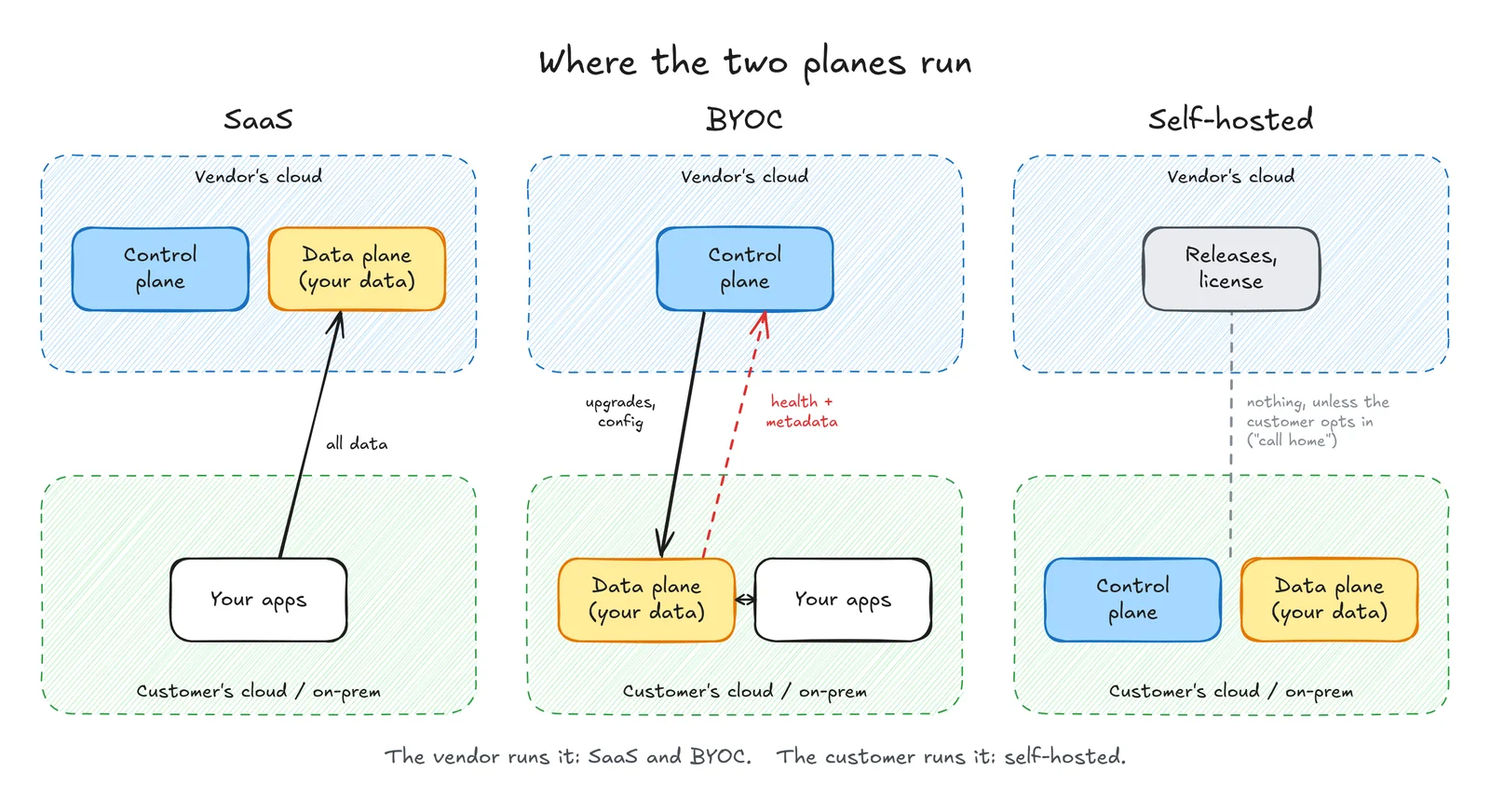
There are two common ways to run the data plane:
- Self-hosted: the customer runs it. By default, nothing comes back to you.
- BYOC (bring your own cloud): you run it inside their account. The customer is paying you to operate it, so they expect you to watch it. turbopuffer puts it simply: "The turbopuffer team is on-call for your cluster."
The control plane is easy: it is your own SaaS. The hard part is a fleet of data planes in accounts you don't own. Materialize describes its support team as "blind to these deployments between escalations".
And you can't just ship everything home. The customer's security team has a say. As Twingate warns: "What's normal telemetry for you is data exfiltration for their security team."
So the question is not "should we send telemetry?" It is "how little can we send and still help?" The good news: Twingate reckons good telemetry alone can diagnose 70 to 80% of issues, without asking the customer for a session.
Step 1: Send a heartbeat first
Think of telemetry as a ladder, an idea I borrowed from Materialize's design. Each step sends more data and answers a bigger question.
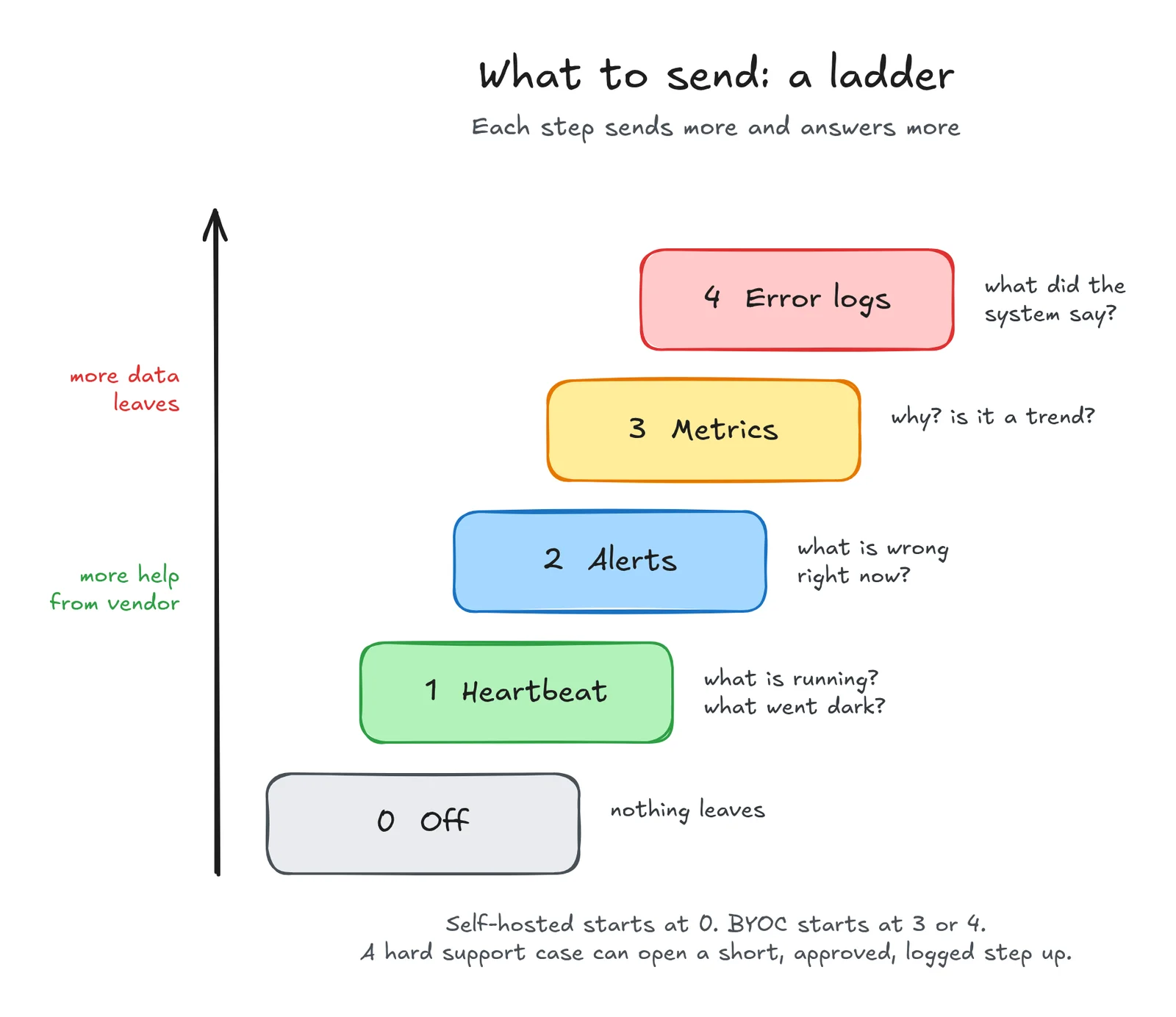
- Off: nothing leaves.
- Heartbeat: what is running, and which install went dark?
- Alerts: what is wrong right now?
- Metrics: why, and is it a trend?
- Error logs: what did the system say?
Start at the bottom. A heartbeat is a small message every few minutes: install ID, version and health, and little else. Twingate's advice is the same: every deployment should regularly report its version, build, feature flags and non-secret config. It holds no customer data, so it is an easy yes for a security team.
Take the slow-queries ticket from the start. A heartbeat alone would have shown you the bank's three-month-old release on day one, before the bank wrote in.
Step 2: Keep the full data with the customer, send yourself a small copy
As you climb the ladder, keep the full data with the customer. The pattern is called a dual write: one collector in the customer's account sends everything to the customer's own stack, and a small, filtered copy to you.
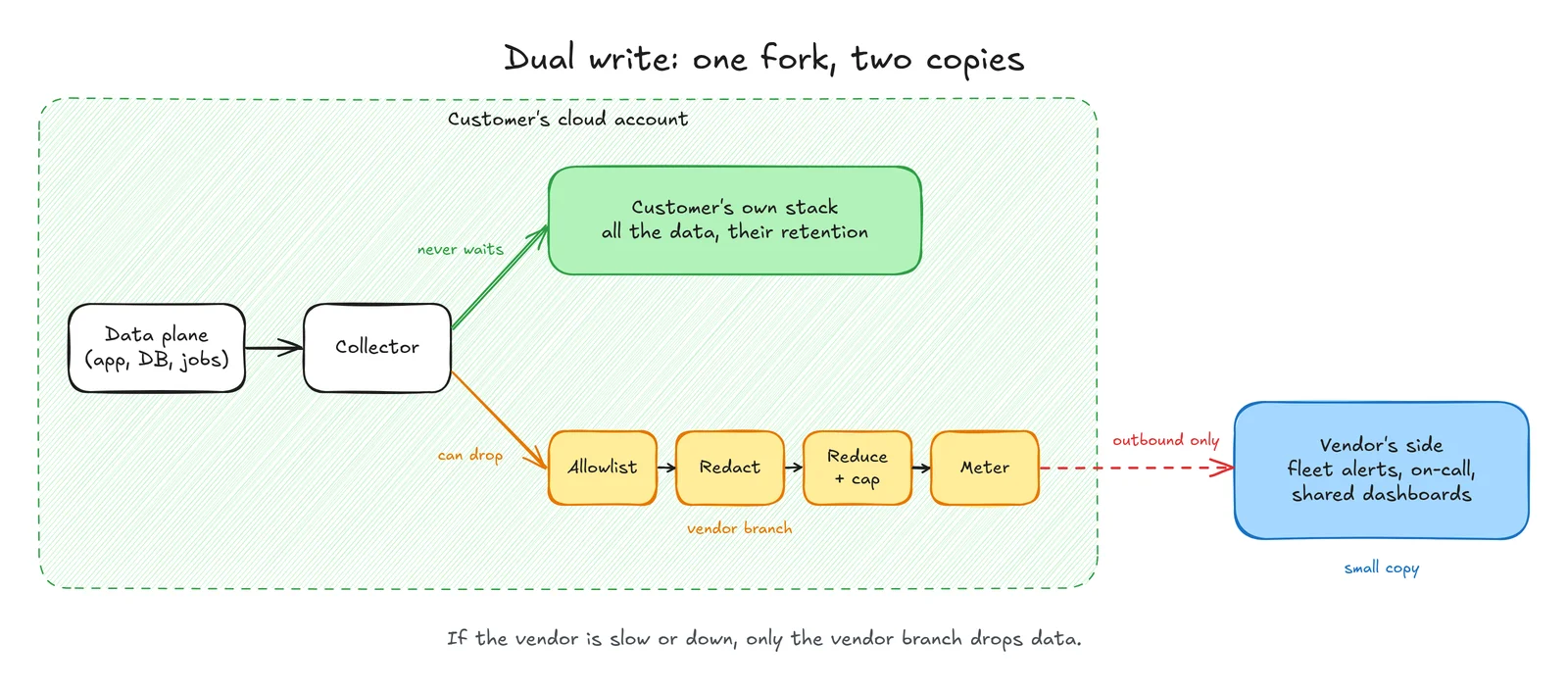
The two copies are not equal. The customer's copy is the one that matters. If your backend is slow or down, your copy is allowed to drop data, but the customer's copy never waits for you. Your outage should cost you visibility, never cost them their monitoring. Materialize's BYOC design is built around this rule.
Step 3: Choose between copying data out and reading it in place
Not every vendor ships a copy home. There are two common shapes.
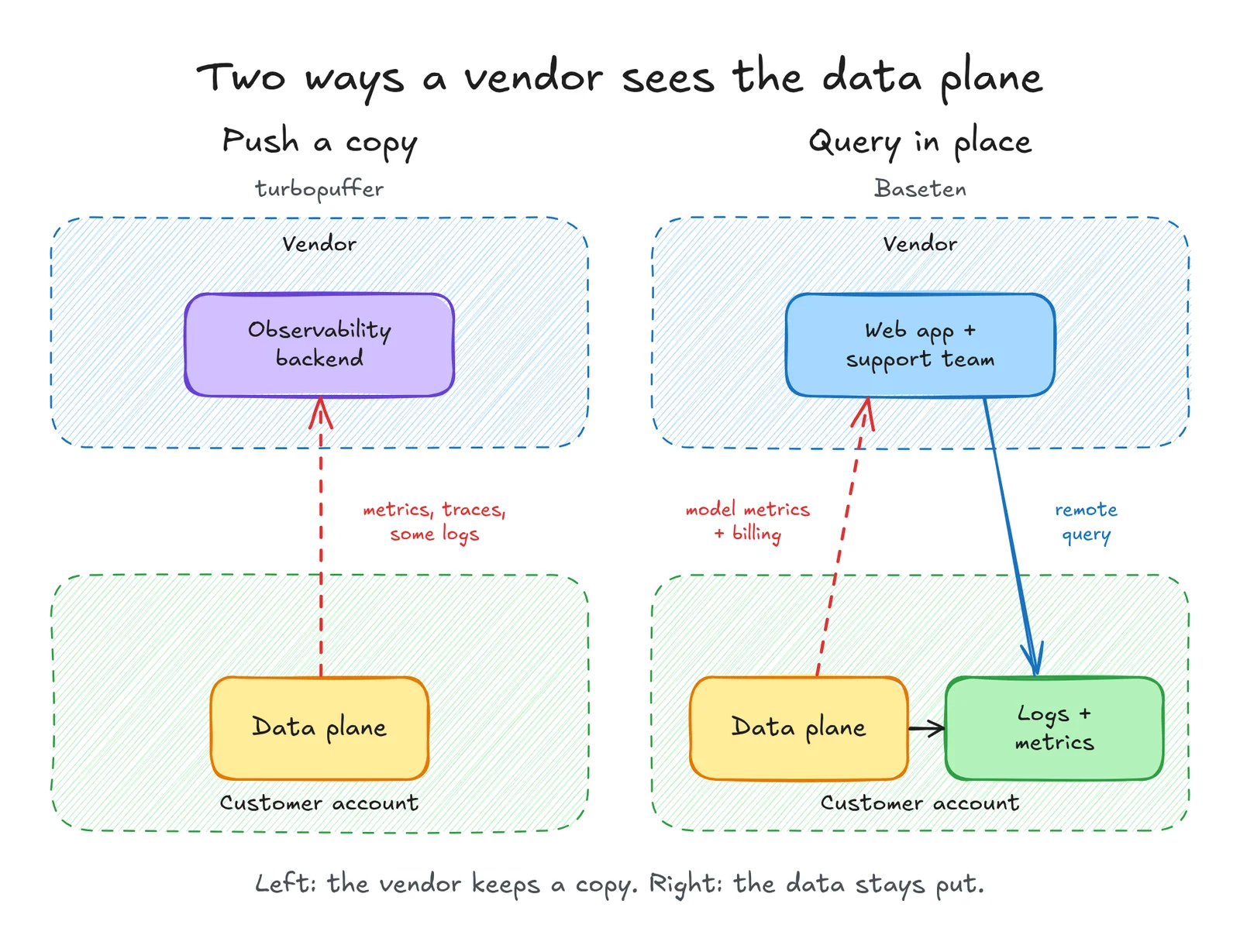
- Push a copy. turbopuffer sends metrics, logs, traces and profiles straight from the customer's account to its own observability tools, and gives the customer a shared dashboard.
- Look in place. Baseten: "Logs and metrics remain in your cluster. Baseten queries them remotely." Stigg does the same: its logs "are not exported outside your cloud account", and every access shows up in the customer's own audit log.
Pushing gives you a fleet-wide view that works while the customer sleeps. Looking in place keeps data at home, but only works when the link is up.
Step 4: Strip sensitive data before it leaves
Whatever you push, filter it on the way out. Logs are the riskiest part, because developers write anything into them: an email, a card number, a whole user object.
A few simple rules go a long way:
- List what may leave, not what may not. Pick the fields you need. A list of "bad patterns" will always miss the next one.
- When in doubt, keep it home. If a line can't be cleaned, don't send it.
- Filter your copy, not theirs. The customer keeps their full logs. The one exception is secrets, like passwords and tokens: strip those from both copies.
Our post on handling PII in your logs goes deeper into where to redact (at the edge, at ingest, or at rest) and how. For a BYOC vendor, the edge is the right place, because the data is cleaned before it leaves the customer's account.
Step 5: Let the customer control what leaves
Trust grows when the customer can see and control what leaves.
- Write it down. VeloDB publishes exactly what it exports and what it never exports, such as table data, query text and query results. That one page answers most security questions.
- Let them pick the level. VeloDB offers two modes: metrics only, or metrics plus warning and error logs. Only the customer should move up the ladder, never you.
- Cap and show the volume. A byte limit on your copy, and a meter the customer can read, keep both the egress bill and the surprises small.
- Make deep access rare and visible. For the hard tickets, Redpanda uses "breakglass" access: an engineer states a reason, and the request must be approved before they can connect.
The same ticket, with telemetry in place
Now replay the slow-queries ticket. This time, the bank's install sends you a heartbeat and a few metrics.
On Tuesday, you see query times go up on that one install. The heartbeat shows it is on a three-month-old release. You write to the bank before it writes to you: "Your queries got slower this week. Upgrading to the latest release should fix it."
No log requests, no screen-share. Materialize's design doc names this exact goal: "so that the first message in the thread can be ours."
Parting thoughts
If you build a BYOC or self-hosted product:
- Make the data plane run without you. As turbopuffer says: "The control plane is not required for the data plane to operate."
- Ship the heartbeat first, then alerts, metrics and logs.
- Keep two copies: a full one for the customer, a small one for you.
- Send only what you need, and clean it before it leaves.
- Let the customer see and cap what leaves.
One gap stood out in my research: almost nobody writes about the backend that receives all this fleet telemetry. It takes data from hundreds of accounts, keeps each tenant apart, and has to stay cheap as installs grow. That is what Oodle is built for. Tag every signal with a tenant at ingest, then query the whole fleet from one place. Read more in observability for SaaS platforms, or see how Oodle BYOC runs in your own cloud.